The Dispatch board: pick, pack, send
Every invoice with goods still to leave, as a board in five lanes. Drag a card along, or tap it to pick, book freight and dispatch.
Where it is
- Inventory → Dispatch
- Dispatch → For the workshop — Parts going to a workshop job, by booking
- Dispatch → Pack bench
- Dispatch → TV mode
Settings for this
- Settings → Shipping & freight — Carrier cut-off (the board’s clock, default 15:00) and pack verification
- Settings → Orders — Customer updates: “On its way” emails the tracking
- Warehouse → Manage → Pick from — Which bins pick lists suggest
Open Inventory → Dispatch. The board shows every invoice with goods still to leave. It moves no stock by itself: goods only leave when you dispatch or mark them collected.
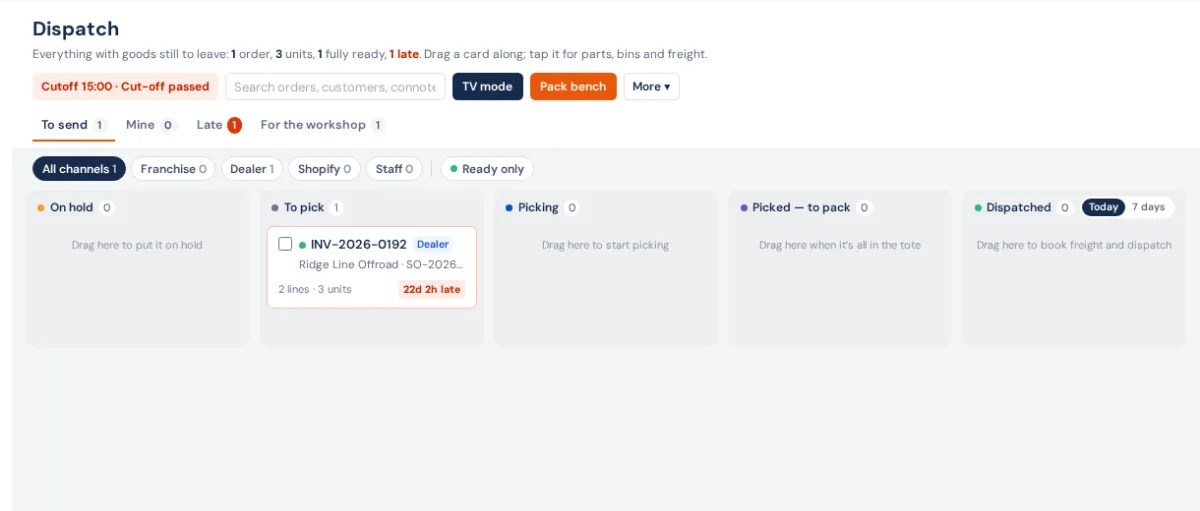
The lanes
| Lane | What's in it | Drag a card here to… |
|---|---|---|
| On hold | Orders waiting on stock (with the POs bringing it in and their ETA), and orders held by hand with a reason | put it on hold (asks for a reason) |
| To pick | New orders land here | put back an order nobody has started |
| Picking | Claimed by a picker — their name shows on the card | claim it and open it to pick |
| Picked — to pack | Everything's in the tote | finish the pick (or open it on the lines still to pick) |
| Dispatched | What went out Today or in the last 7 days | open freight and dispatch |
An order waiting on stock moves back to To pick on its own once the PO is received. A hand-set hold stays until someone clicks Release or drags it out.
Finding orders
- Views: To send, Mine, Late (missed its cutoff) and For the workshop (parts for fitting jobs — they go to a bay, not a courier, so they follow the booking, not the cutoff).
- Channel chips: All channels, Franchise, Dealer, Shopify, Staff. Ready only shows orders with all their stock in.
- Warehouse picker (more than one warehouse), and search (/) for orders, customers and connotes.
- The clock at the top counts down to today's Cutoff; each card's clock turns red when it's late.
Working an order
Click a card to open it. The Pick tab lists each line in bin-walk order with big tick boxes; the Ship tab (or Collect for a pickup) holds freight and dispatch. One button always shows the next step: Start picking, Pick all remaining, Finish picking, Book freight, Dispatch goods, Customer collected or Mark fitted. See Get one order out the door.
- Quick book — for a small order you can grab in one trip: claims it, ticks every line, marks it picked and opens carrier rates in one click.
- Several orders in one walk — tick cards and Create wave. See Waves.
- Someone else picking it? You're asked before you Take it over; their ticks stay.
The menu (…)
Day close, Performance and Orders desk; Pack bench and TV mode sit beside it. See Day close, performance and TV mode.
Who can use it
The page needs Use Dispatch: the board, TV mode, Day close and Performance in Settings → Roles. Owners, admins, managers and the warehouse role have it by default; tick it for any other role that packs and sends orders.
If something's not right
- "Already part-picked — open it and untick the lines to put it back." An order with ticks can't go back to To pick.
- "This one was marked picked on the invoice — reset it there to pick again."
- "Choose a warehouse first — a wave is one walk of one building." Pick a warehouse before Create wave.
- "This order can't be held from here" — open it on the Orders desk.
- Dispatch isn't switched on yet — the feature hasn't been set up on your account; contact support.