Workshop settings: labour rates, job types, technicians, hours
Everything under Settings → Workshop: bays, work centres, technicians and their hours and rates, default labour rates and pace, trading hours and holidays, job types, checklists, board labels, the default service interval and the courtesy car agreement.
Where it is
Settings for this
- Bays — Bays, hoists and work areas; Use bays and hoists; Boxed in by
- Work Centres — Optional departments for capacity; Use work centres
- Technicians — Who can be booked; hours, absences, rates, skills
- Labour & pace — Default rates, target GP/hr, auto-stop timer, pace alerts
- Trading Hours — Open hours, closures and public holidays
- Job types — Rename, recolour, hide, reorder, add
- Checklists — Check-In, QC and Delivery lists
- Board labels — Card labels and hold reasons
- Service due — Default service interval: months and kilometres
- Courtesy cars — The loan agreement customers sign
- Settings → Modules & flow — Switch the Workshop module on or off
Settings → How you work → Workshop appears when the Workshop module is on (Settings → Modules & flow). Its tabs:
Bays
Bays: + Add Bay: Bay Name, Type (Bay, Hoist or Work Area), Work Centre, Capacity, Boxed in by (a hoist that can't get out while another bay is busy), Sort Order and Status. Use bays and hoists (on by default): off schedules by technician only, right for mobile or service-only shops.
Work Centres
Work Centres: departments such as Mechanical or Electrical, with Kind, Capacity (parallel jobs) and Default Cost Rate. Use work centres is off unless you have some; most workshops don't need them.
Technicians
Technicians: only staff enabled here can be put on jobs or show in capacity.
- Under Add from Staff, press + Enable beside a person (add people first in Settings → Team).
- Edit to set:
- Work Hours: Employment Type, Max Daily Hours, Max Weekly Hours, or a Custom weekly roster (hours per weekday). If they have a roster in People → Workers, hours come from it.
- Absences: Type, From, To, then Add (or Request, if you can't approve leave).
- Labour Rates: Cost Rate ($/hr) and Charge Rate $/hr (ex GST). Blank uses the defaults. Only shown with See others' labour rates.
- Trade, Qualifications, Specializations and Notes.
- Remove takes them off the technician list.
Labour & pace
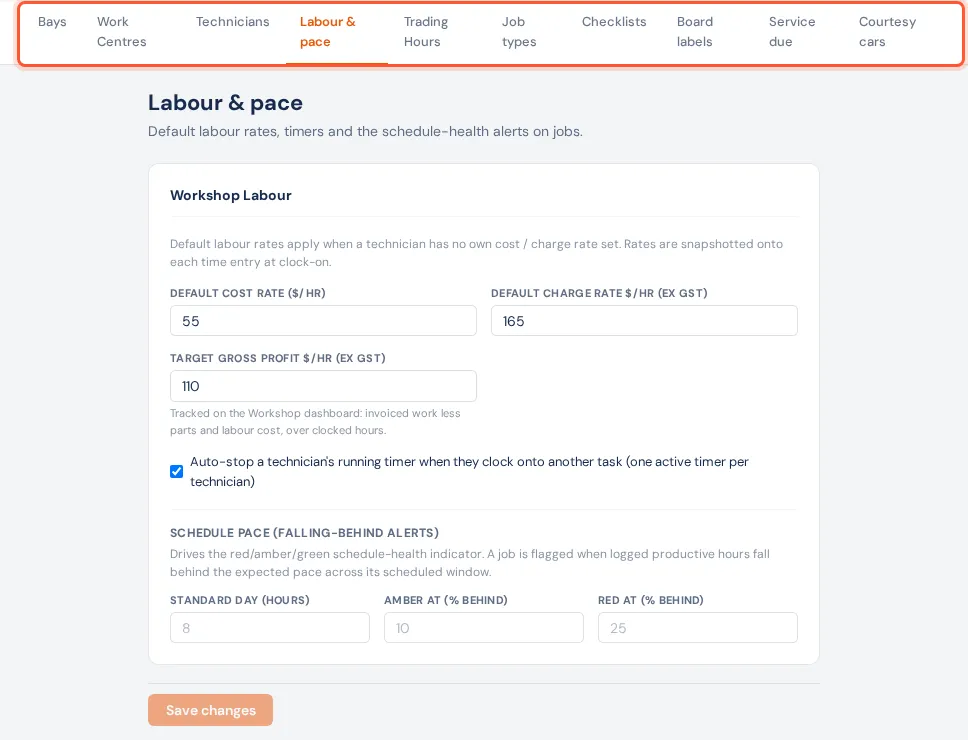
Labour & pace: Default Cost Rate, Default Charge Rate (ex GST) and Target Gross Profit $/hr (tracked on Reporting → Workshop); Auto-stop a technician's running timer when they clock onto another task (on by default); and the pace alerts: Standard Day (8 h), Amber at (10% behind), Red at (25% behind). Save changes needs the permission to manage the business.
Trading Hours
Trading Hours: open and close times per weekday (Save Hours). They drive the scheduler, capacity and Smart Schedule; closed days are never bookable.
- Closures: a name, from and to dates, and Public holiday for a real one (it then counts in the holiday band on timesheets), then + Add.
- Public holidays: pick your state (and area, where it matters), tick Add public holidays automatically and Save. They arrive as closures marked "Public holiday · auto"; remove any that don't apply and they won't come back. Check now tops them up. Only an owner or admin can change this.
Job types
Job types: rename a type in its box, choose its colour, Shown/Hidden, reorder with ▲▼, Reset a built-in one, Delete an unused custom one, and + Add job type. Install, Service, Inspection and Reconditioning are made by BuildTrack, so they can be renamed but not hidden. Needs settings.edit.
Checklists and Board labels
See Customise the checklists and Holds.
Service due
Service due: Every (months) and Every (km), the default interval for a vehicle with fewer than two services and no service plan (BuildTrack's default is 12 months or 10,000 km). It sets the dates on Workshop → Service due and the Service reminder flow. See Service due.
Courtesy cars
Courtesy cars: the Agreement text customers sign when you lend them a courtesy car. Reset to default goes back to BuildTrack's standard terms. See Courtesy cars.
Elsewhere
- Canned jobs and what's bookable online: Workshop → Canned Jobs.
- Inspection templates: Inspections → Manage Templates.
- Workshop permissions: Settings → Roles.
- Job-ready message wording and suggestions: Integrations → Customer Messaging.
- Workshop hours report targets: Settings on Reporting → Workshop hours.