Parts on a job
The Parts tab tracks every part a job needs: held for it, picked off the shelf and fitted. Order what's short from there. Stock leaves at hand-over, from the job's invoice.
Where it is
- Workshop → Jobs — Open the job, then the Parts tab
Settings for this
- Settings → Purchasing — PO approval rules for the POs + Order Parts makes
- Settings → Roles — See cost of goods: the Cost column and Material total
Where it is
On the job, the Parts tab. The Parts Required heading carries the parts pill (Parts missing, Parts partial or Parts ready), and an amber "n to order" when something has nothing behind it.
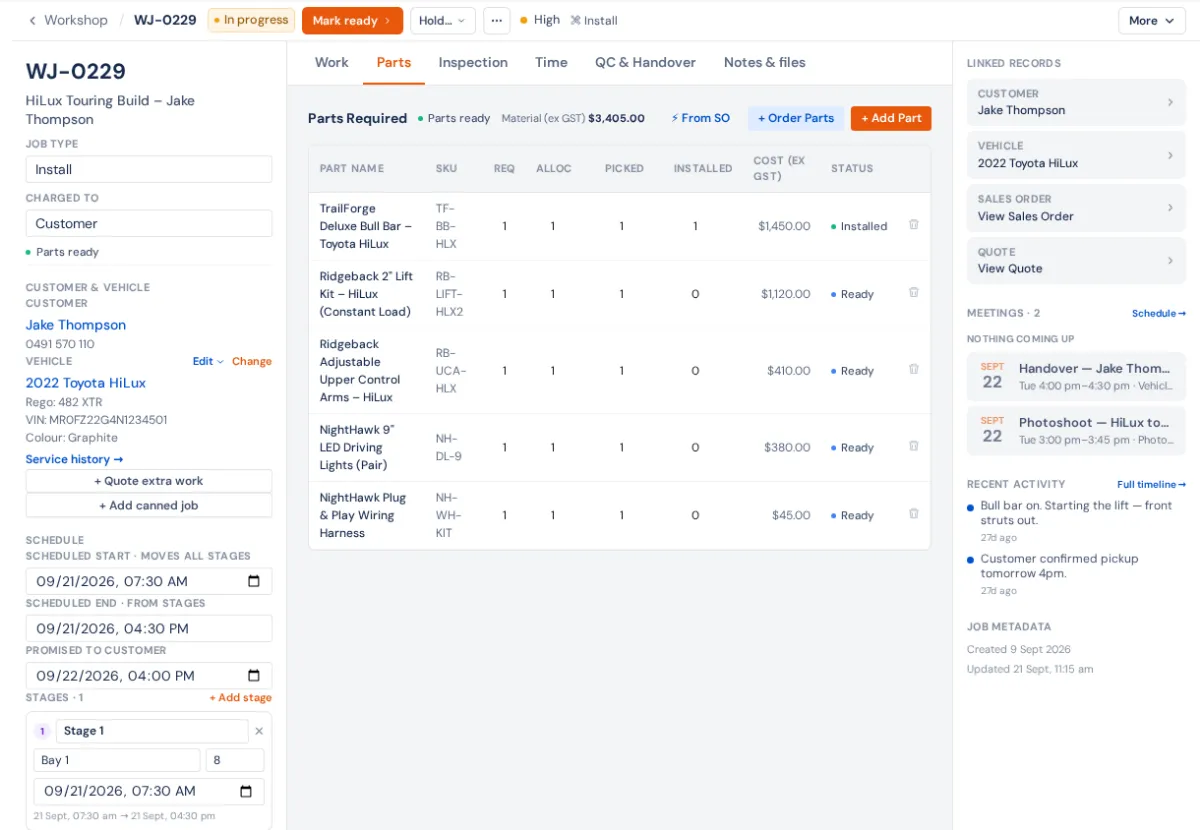
| Column | Counts |
|---|---|
| Req | How many the job needs |
| Alloc | Held in stock for this job (live from the sales order, if it has one) |
| Picked | Taken off the shelf |
| Installed | Fitted to the car |
Each part also reads To order, Partial, Ready or Installed.
Step by step
- Bring the parts in. A job from a sales order already has them. If the order changes, press ⚡ From SO to update the job; picked and installed counts are kept.
- Add one by hand: + Add Part, then the part name, SKU and quantity.
- Order what's short: + Order Parts, choose the Supplier, Create PO. It orders only the real shortfall (not what's fitted, picked, held or already on an open PO for this job) and opens the PO to approve and send. See Purchase orders.
- Pull them: More → Pick list prints the parts with their bins.
- Fit them: type Picked and Installed as you go. On a phone, Fitted ✓ fills both.
A short part holds the job up: put it on hold as Waiting on parts (Holds).
When stock actually leaves
Not when you pick or install. Stock leaves when you Hand over or Close the job, from the job's invoice. Raise the invoice before you hand over. Marking the invoice Delivered on the invoice page does not take the parts out, and a job closed with no invoice leaves its parts on the shelf (the Orders desk then asks someone to record them out).
Who sees what
The Cost column and Material total show only to roles with See cost of goods (COGS) in Settings → Roles.
If the job came from a sales order, the order is the source of truth for what was sold; ⚡ From SO re-syncs the job's copy.