QC and handover checks
Check the work line by line on 1 · QC, then document the handover with photos and signatures on 2 · Delivery, and mark the job ready.
Where it is
- Workshop → Jobs — Open the job, then QC & Handover
Settings for this
- Settings → Workshop → Checklists — The QC and Delivery lists, what blocks a pass, signatures
- Settings → Roles — Perform QC sign-off; Mark jobs delivered
On the job, QC & Handover has two steps: 1 · QC and 2 · Delivery (a ✓ or ✗ shows how each went).
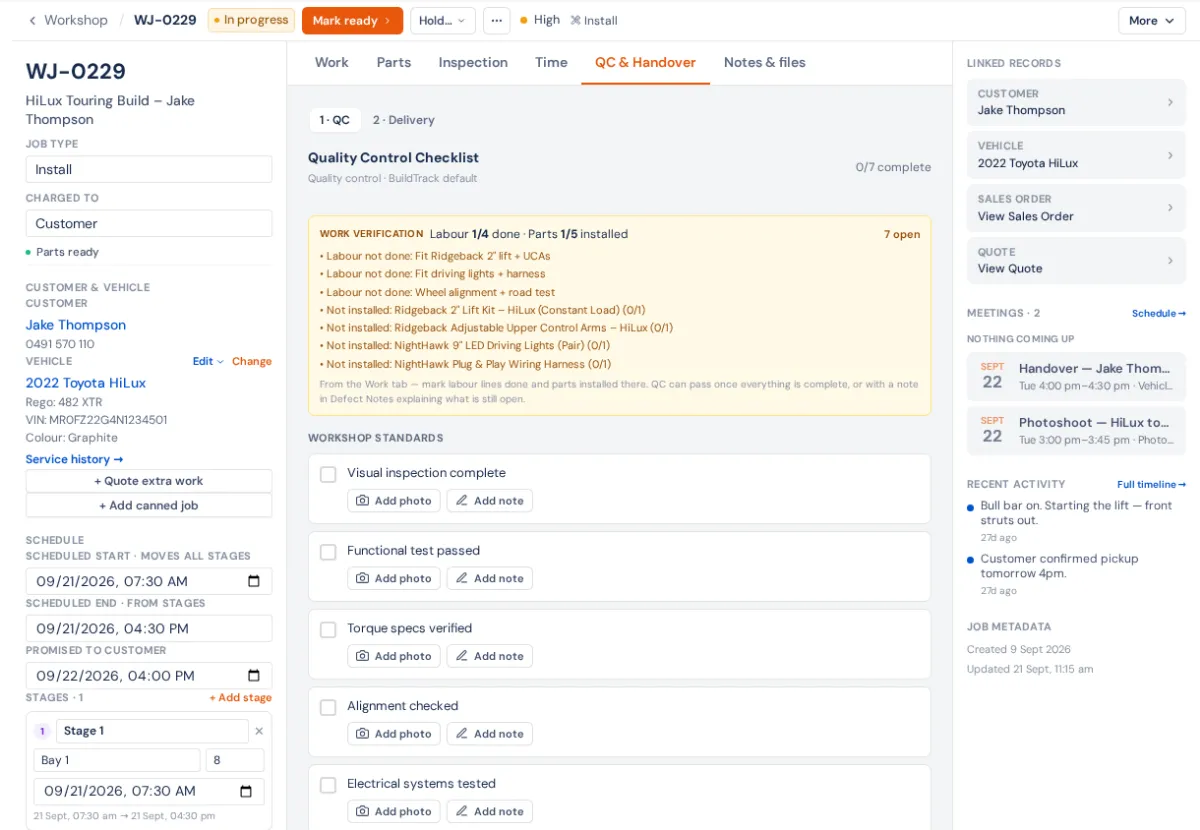
1 · QC
- Answer every line of the Quality Control Checklist (tick, Pass, Fail, N/A, a measurement or text), with photos and notes where asked.
- Work verification shows whether every labour line is done and every part installed; anything open is listed.
- Write anything wrong under Defect Notes / Rework Required. A note there also lets you pass while Work verification still shows open lines, as an exception.
- Sign, if your list asks: Technician sign-off and Customer signature.
- Save & Pass QC ✓, or Save & Fail QC.
Pass stays greyed out until every required line (and its photo or note) is done; the list above the buttons says what's in the way. A failed QC leaves the job In progress, and Mark ready warns until it passes. While it waits, hold it as In QC.
2 · Delivery
- Photo Documentation: Marketing Gallery, Work Documentation (required: at least one proof photo) and Handover Documentation.
- Work through the delivery checklist (the parts appear under Items Delivered if your list lists them one by one).
- Signatures, if asked. Save Checklist saves as you go.
- Mark Ready for Delivery moves the job to Ready. Its label says what's missing: "QC must pass first", "Checklist 6/8", "Technician signature" or "Add a proof photo".
Mark ready at the top of the job needs QC passed (or not started) but not the delivery list. Once Ready, send the ready message; when the customer collects, Mark Delivered ✓ here or Hand over at the top.
Who can do it
QC needs Perform QC sign-off; without it the tab says so. Marking ready and delivered needs Mark jobs delivered. Both are in Settings → Roles.
Settings that change this
In Settings → Workshop → Checklists: the lines, Signature to finish, A failed line blocks "Pass QC" (or "Ready for delivery"), how the job's parts and labour appear, and a stricter list per job type. See Customise the checklists.