Tell the customer the job's ready
One message with photos of the finished work, the invoice and a way to pay, plus suggestions. Review it, then send by SMS, email or both.
Where it is
- Workshop → Jobs — Open a Ready job: Notify customer — ready
Settings for this
- Integrations → Customer Messaging — Connection, the message wording (Templates) and your Upsell products
- Integrations → Stripe — Card payments: the Pay now button
- Settings → Quotes & invoices — Bank details shown when you don't take cards
- Settings → Customer portal — Review link shown after the customer pays
Notify customer — ready appears once the job is Ready (or later) and has a customer. On desktop it's the blue button at the top of the job; on a phone it's in the ⋯ menu. Raise the invoice first if you want the customer to see it and pay.
Step by step
- Press Notify customer — ready. "Your vehicle is ready" opens with a live preview of the customer's page.
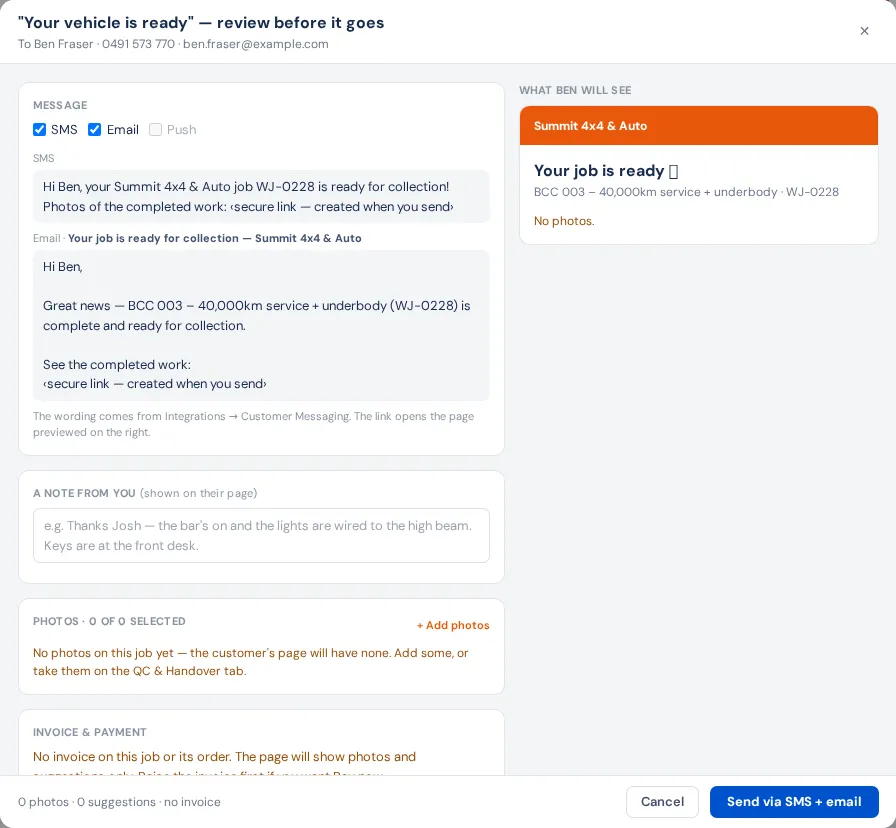
- Message: tick SMS, Email or both.
- A note from you: shown on their page (where the keys are, anything you noticed).
- Photos: the QC & Handover photos are ticked. Click one to leave it out, Select all, Clear, or + Add photos.
- Invoice & payment tells you what the page will show: Pay now (money owing, card payments on), your bank details with the invoice number as reference (no card payments), or a thank you (paid in full).
- While you're here: your usual suggestions, plus any product you search for. Remove any with ✕.
- Press Send via SMS + email (the button names the channels ticked).
It shows Sent. and the link; Copy link copies it for a message from your own phone.
What the customer sees
Their own page (with your logo): Your job is ready 🎉, your note, Completed work photos, the invoice with Amount due and Pay now or Pay by bank transfer, suggestions with I'm interested →, and, once paid, Thank you!, Paid in full and Leave us a review if you've set a review link. A card payment goes onto the invoice by itself.
Settings that change this
- Customer Messaging: must be connected to send. Templates holds the wording; Upsell products is your usual suggestion list.
- Stripe: turns on Pay now.
- Quotes & invoices: the bank details shown when you don't take cards.
- Customer portal: Review link.
If something's not right
- "Connect OneSignal in Integrations → Customer Messaging first". Nothing was sent; connect it.
- "No invoice on this job or its order". The page shows photos and suggestions only. Raise the invoice first if you want Pay now.
- No bank details on file. Add them under Quotes & invoices.
- The button isn't there. The job isn't Ready yet, or has no customer.