Freight and shipping setup
Where goods ship from, your freight margin, the courier cut-off, your own rate tables, and connecting carriers for live rates and labels.
Where it is
Settings for this
- Settings → Shipping & freight — Ships from, margin & defaults, cut-off, pack verification, rate tables
- Integrations → Freight carriers — Live carrier connections (keys, card, MyPost, label size)
- Product → Edit → Packed size — Each product’s box size, weight and multi-box cartons
- Products → Pack Sizes (AI) — Fill in missing packed sizes in bulk
- Settings → Network → Freight — Head office: how franchise orders are charged freight
Freight settings live in two places: how you price and run freight in Settings → Shipping & freight, and carrier connections in Integrations → Freight carriers.
Settings → Shipping & freight
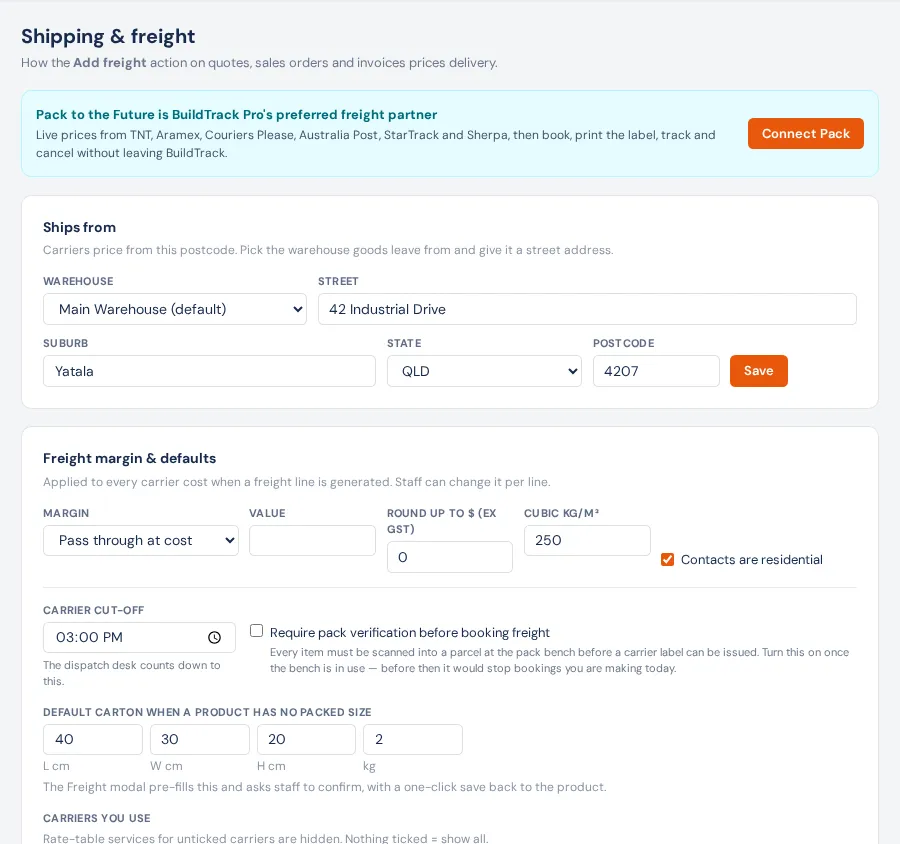
Ships from — choose the warehouse goods leave from and give it a street address. Carriers price from this postcode. With none, the Freight action falls back to your business address, and won't price at all if that's empty too.
Freight margin & defaults (press Save defaults):
- Margin — Pass through at cost, Mark up by % or Add a fixed $, applied to every carrier cost when a freight line is made. Staff can change it per line.
- Round up to $ (ex GST) — 0 = none.
- Cubic kg/m³ — the default cubic conversion (250 if blank).
- Contacts are residential — treat delivery addresses as residential by default.
- Carrier cut-off — default 15:00. The Dispatch board counts down to it and cards turn red after it; the Orders desk uses it as the dispatch deadline.
- Require pack verification before booking freight — default off. When on, every item must be scanned into a box at the pack bench before a label can be booked.
- Default carton when a product has no packed size — pre-filled in the Freight window for staff to confirm.
- Carriers you use — rate-table services for unticked carriers are hidden. Nothing ticked = show all.
Rate tables — your own negotiated rates, no integration needed:
- Add Zones: a name and postcode ranges (e.g. Metro 4000-4207). Typical: Metro, Regional, Interstate, Remote.
- Add Services: carrier, service name, cubic factor, transit days, max kg and package types.
- Open a service and fill the grid: the charge (ex GST) for each weight band (Up to kg) in each zone, and the last row's $ per kg over the top band. A blank cell means the service doesn't go there at that weight.
Integrations → Freight carriers
Connect an account and the Freight action asks it for live prices alongside your rate tables. Keys are stored on the server and only admins can read them.
- Pack to the Future (preferred partner) — one click opens your own Pack account. Then save a card (Charge bookings to) and, for Australia Post, connect MyPost Business. Choose a Label size. A test key books dummy consignments.
- MachShip — your own carrier contracts, one API token.
- Australia Post (retail) — free retail parcel rates.
- Transdirect — resold rates; choose what bookings are charged to.
- Interparcel — resold rates; bookings finish in your Interparcel Shipping Manager.
Disconnect removes a carrier.
On each product
A product's Edit → Packed size: Length / Width / Height (cm), Weight (kg), Packed as, Contains multiple boxes (one unit ships as several cartons — pickers see each box), Ships separately (never consolidated) and Dangerous goods. Freight type is for reporting. Missing sizes in bulk: Pack Sizes (AI).
Who can change it
Viewing needs settings access; saving needs edit settings. Head office sets franchise freight charges in Settings → Network → Freight.