Which way a sale goes: Modules & flow
An accepted quote becomes a sales order, a workshop job or an invoice. Settings → Modules & flow decides which, and Settings → Orders decides whether it happens by itself.
Where it is
- Sales → Quotes — The Accepted tab
- Orders desk — Accepted quotes not yet turned into anything show "Turn into an order"
Settings for this
- Settings → Modules & flow — When a quote is accepted: By quote type, Sales order or Invoice; and the Workshop module on or off
- Settings → Orders — Turn accepted quotes into orders, Hold the stock, Draft POs for what’s short
Who this is for: owners and admins setting up how sales run, and anyone wondering why an accepted quote became what it did.
The setting
Settings → Modules & flow, under How you work. Only an owner or admin can change it.
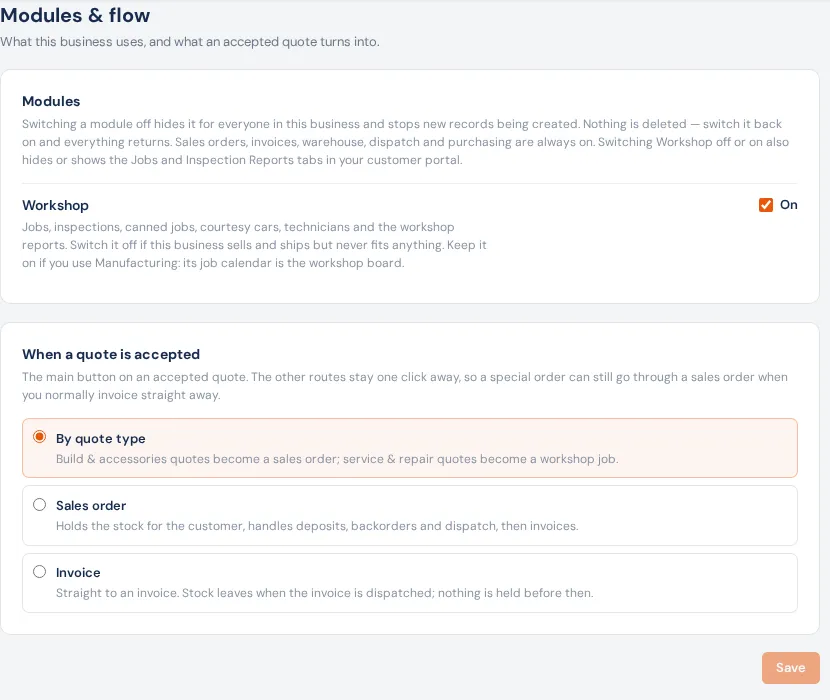
Modules: Workshop can be switched off if you don't do workshop jobs. It hides the workshop pages for everyone and stops new jobs (nothing is deleted). Sales orders, invoices, warehouse, dispatch and purchasing are always on.
When a quote is accepted:
| Choice | An accepted quote becomes | Suits |
|---|---|---|
| By quote type (default) | Accessories & Build → a sales order. Service & Repair → a workshop job, with a sales order behind it. | Workshops that also sell parts |
| Sales order | Always a sales order. It holds the stock, takes the deposit, handles backorders and dispatch, then invoices. | Mostly selling and shipping |
| Invoice | Straight to an invoice. Nothing is held; stock leaves when the invoice is dispatched. | Counter sales, no fitting |
While Workshop is off, By quote type sends every quote to a sales order. Press Save.
It happens by itself
With Turn accepted quotes into orders on in Settings → Orders (on by default), an accepted quote becomes whatever the setting says within a few minutes (it waits about 3 minutes after the customer accepts, then BuildTrack checks every couple of minutes). Hold the stock (on) makes the new sales order hold free stock; Draft POs for what's short (off) puts short lines onto draft purchase orders for each product's preferred supplier.
It runs while someone who can create sales orders has BuildTrack open, and catches up when someone signs in. Quotes accepted before you switched it on are left for you.
Doing it by hand
On an accepted quote the main button follows the setting: Create Sales Order, Create Workshop Job or Create Invoice. Once done it reads View Sales Order, View Workshop Job or View Invoice. Other routes sit beside it so a one-off can go another way: Create Invoice (until a job exists), Create Sales Order when you normally invoice, and Create Workshop Job on a Service & Repair quote while Workshop is on. Doing it by hand holds the stock, but only the automatic run makes draft POs. On the Orders desk the same quote shows Turn into an order, and Make the order does it.
Extra work quoted from a job with + Quote extra work always goes back onto that job (the button reads Add to the Workshop Job).
One way per quote. Don't make an invoice from the quote and a job or sales order: the job and order raise their own invoice, so the customer would be billed twice. Once a quote has a job, it stops offering Create Invoice.
If something's not right
- A repair quote became a sales order. Its Type was Accessories & Build (the default for new quotes), or Workshop is off. Set the Type before sending.
- Accepted, but no order yet. Nobody who can create sales orders has had BuildTrack open since, or Turn accepted quotes into orders is off. Press Make the order on the desk.
- The desk says "Couldn't turn into an order automatically". Open the quote and press its main button; the message tells you what stopped it.