Orders settings: targets, on duty, alerts and automation
One page decides how the Orders desk times orders, who hears about new ones, which steps run by themselves, and which update emails customers get.
Where it is
- Settings → Orders
- Sales → Orders — The desk these settings drive
Settings for this
- Settings → Orders — Everything below
- Settings → Shipping & freight — Carrier cut-off (default 3:00 pm): the “send it” deadline
- Settings → Workshop → Trading hours — The hours, closures and public holidays the clocks count
- Settings → Modules & flow — What an accepted quote turns into
Who this is for: owners and managers. Anyone can look; changing it needs permission to edit settings.
Settings → Orders, under How you work. Press Save after any change.
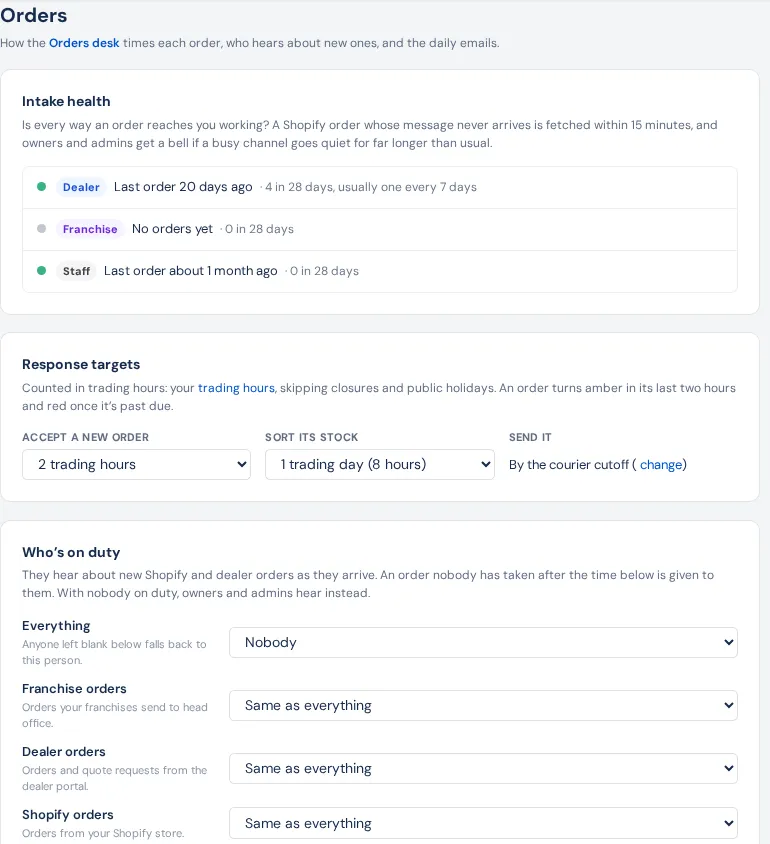
| Section | What's in it | Default |
|---|---|---|
| Intake health | For each channel, when the last order arrived and its usual rate, and whether Shopify's 15-minute missed-order check is running. Owners and admins get a bell if a busy channel goes quiet. | — |
| Response targets | Accept a new order and Sort its stock, in trading hours. Send it is by the courier cut-off (set in Shipping & freight). | 2 trading hours; 1 trading day; 3:00 pm cut-off |
| Who's on duty | A person for Everything, and optionally for Franchise orders, Dealer orders, Shopify orders and Staff orders (blank = same as Everything). They hear about new Shopify and dealer orders as they arrive, and get the Stock is in bell for orders nobody owns. Give unclaimed orders to them after hands over orders nobody has taken (Off, 5, 15, 30 or 60 minutes). | Nobody (owners and admins hear); 15 minutes |
| Alerts and daily emails | A bell to the owner three-quarters of the way to a deadline; to the owner and managers once overdue. Send the daily emails: at 7:30 am (your business's time zone) each person gets the orders they own, and unowned ones go to whoever is on duty; at 4:30 pm managers get anything still late. | On |
| Orders that move themselves | Turn accepted quotes into orders, Hold the stock and Draft POs for what's short. | On, on, off |
| Customer updates | Emails to the customer: Order confirmed, On backorder (with the date, and again if it changes) and On its way (with tracking). | All off |
Trading hours come from Settings → Workshop → Trading hours, skipping closures and public holidays.
Good to know
- Orders that move themselves runs from any signed-in staff session that can create sales orders, every couple of minutes, and leaves a newly accepted quote about 3 minutes first. Overnight it catches up when someone signs in. Quotes accepted before you switched it on are left for you.
- Draft POs for what's short makes draft purchase orders for each line's preferred supplier, one per supplier. Nothing goes to a supplier until someone sends it.
- Order bells clear themselves once the order moves on, is snoozed or held.