Stripe card payments
Connect your own Stripe account, then choose where customers can pay by card: the Showroom POS, invoices, the customer portal, quote deposits and the dealer portal.
Where it is
Settings for this
- Integrations → Stripe → Where customers can pay by card — Five switches, all off until you turn them on; maximum online payment
- Settings → Quotes & invoices — Bank details shown when card is off; card surcharge
Payments go straight into your Stripe account and pay out to your bank. Stripe charges its fees on your account. BuildTrack never sees card details.
Connect
- Open Integrations → Stripe.
- Press Connect Stripe and sign in to Stripe (or create an account on the way), then approve BuildTrack Pro.
- Back here the Stripe account card shows Connected. If it says Connected — not ready, finish your details in Stripe, then press Refresh status. Until then no "Pay now" is offered anywhere.
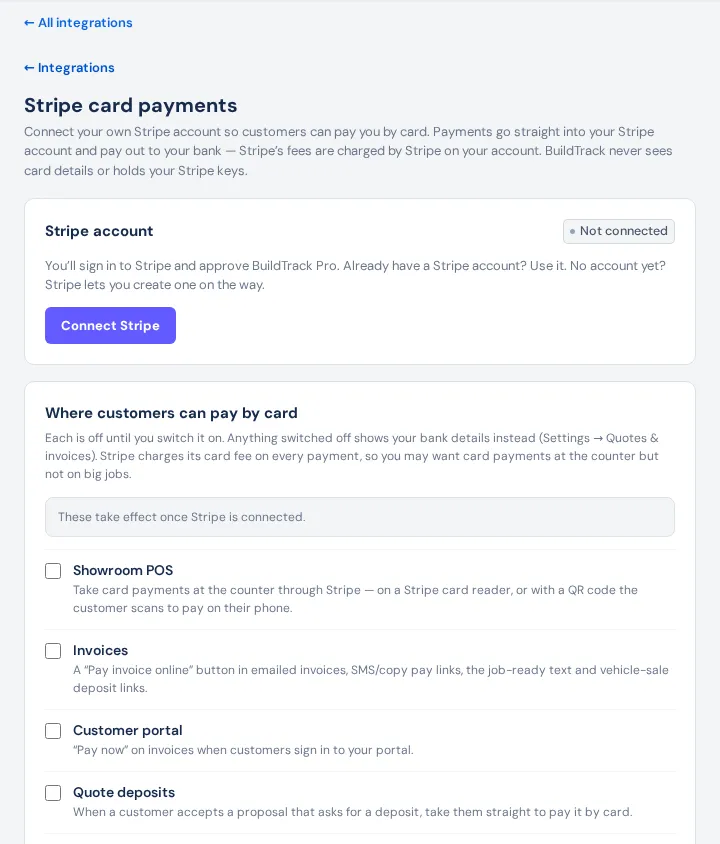
Choose where customers can pay by card
Under Where customers can pay by card, each is off until you tick it:
- Showroom POS: card at the counter, on a Stripe card reader or by QR code on the customer's phone.
- Invoices: a Pay invoice online button in emailed invoices, SMS and copied pay links, the job-ready text and vehicle-sale deposit links.
- Customer portal: Pay now on invoices when customers sign in.
- Quote deposits: when a customer accepts a proposal that asks for a deposit, they go straight to pay it.
- Dealer portal: dealers pay their invoices by card.
Maximum online payment (optional): invoices, deposits and portal payments above this aren't offered by card; the customer sees your bank details instead. The POS isn't limited. Press Save.
Anything switched off shows your bank details from Settings → Quotes & invoices instead.
Card readers
Register a BBPOS WisePOS E or Stripe Reader S700 in your Stripe dashboard (Terminal → Readers). It then appears in the POS under Card — Stripe. With no reader, the POS shows a QR code. Your existing EFTPOS terminal keeps working.
Card surcharge
A surcharge on card payments you record is set under Settings → Quotes & invoices (Offer a card surcharge when recording a card payment), not here.
Who can do it
The page opens with View settings; connecting and changing switches needs Edit settings.
If something's not right
- "That Stripe account is already connected to another business": each Stripe account can serve one BuildTrack business.
- Customers don't see Pay now: check the switch for that place is ticked, the account is Connected (not "not ready"), and the amount is under your maximum.
- Disconnect stops card payments everywhere; payments already made aren't affected and your switches are kept.