Reporting: every report and what it shows
Reporting covers executive, sales, online store, finance, revenue, workshop, inventory and stock valuation, orders, purchasing, tasks, technicians, workshop hours, tickets and retention, plus scheduled emails and your own dashboards.
Where it is
- Reporting → Executive — What needs a decision, the four key numbers, Ask your business
- Reporting → Scheduled — Email digests and alerts
- Reporting → Custom — Build your own dashboards
Settings for this
- Settings → Roles — Reports and Financials permissions decide which reports show
- Reporting → Scheduled — Digests, threshold alerts, quote hit list
Open Reporting in the sidebar (under System). The left-hand menu groups the reports.
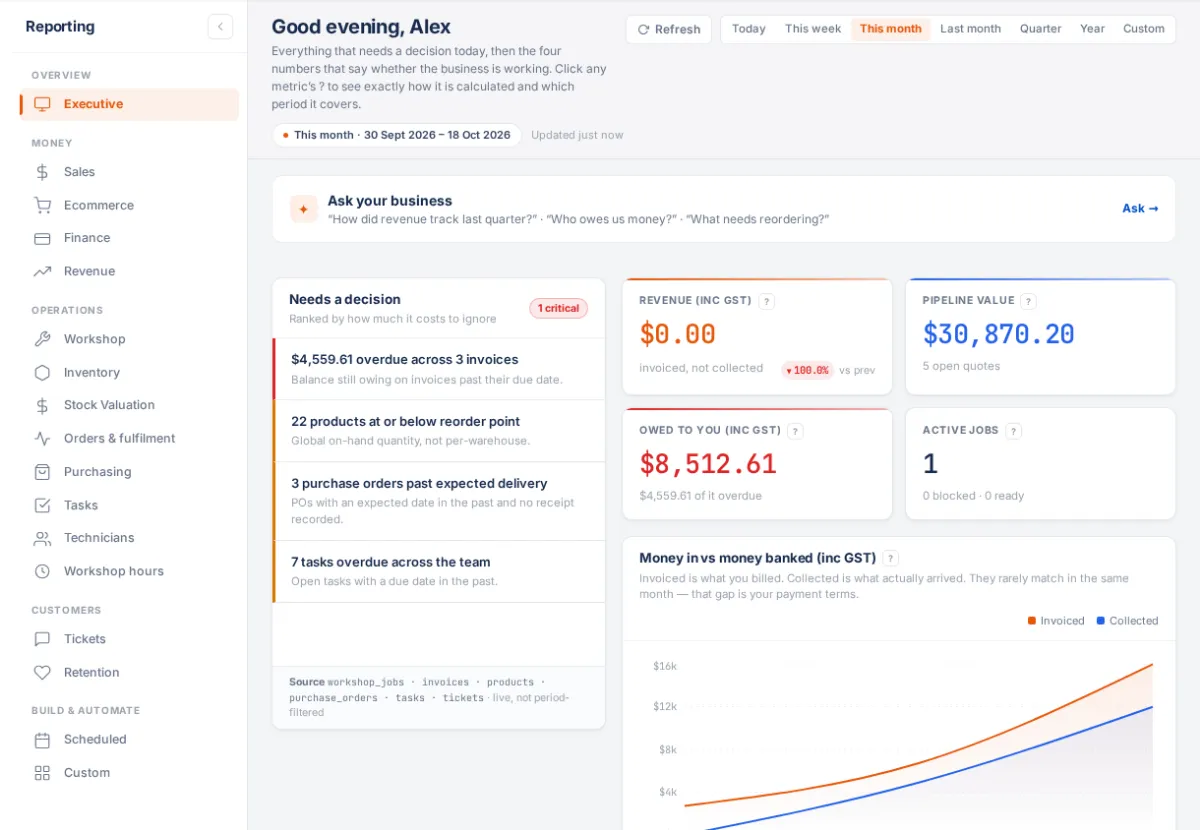
Every page has
- A date range at the top: Today, This week, This month, Last month, Quarter, Year or Custom. It's shared by every report and remembered. Pages that show the current state say Live.
- Refresh to re-run the figures.
- A ? on each figure explaining exactly how it's calculated.
- A CSV button on most pages (named for what it downloads, e.g. Quotes CSV). It needs Export reports in Settings → Roles; without it the button is greyed out.
Overview
- Executive: Needs a decision (ranked by what it costs to ignore, each linking to the list), then revenue, pipeline, what's owed to you and active jobs, and money invoiced against money banked. Also the setup checklist until you're set up.
- Ask your business: on the Executive page, ask a question in plain English ("Who owes us money right now?", "What needs reordering?"). It answers from your own reports, read-only.
Money
- Sales: quotes, conversion and pipeline.
- Ecommerce ("Online store"): Shopify sales.
- Finance: invoiced, collected, owed and overdue.
- Revenue: revenue by customer and period.
Operations
- Workshop: jobs and what needs attention.
- Inventory and Stock Valuation (as at a date, per warehouse).
- Orders & fulfilment: how fast orders are accepted, sourced and sent.
- Purchasing: supplier spend and late deliveries.
- Tasks: tasks and who's behind.
- Technicians: performance per technician.
- Workshop hours: hours sold, clocked, delivered and invoiced by month, with a work list (no time clocked, not invoiced, sold with no job…).
Customers
Build & automate
- Scheduled: emails on a schedule and alerts. See Scheduled reports and alerts.
- Custom: your own dashboards. See Build your own dashboard.
Cash and accrual
"Collected" figures count payments by the date they were paid (cash). "Invoiced" and revenue figures count invoices by their date (accrual). Money is labelled inc or ex GST.
Who sees what
- Reporting needs View dashboards or View financial reports.
- Ecommerce, Finance and Revenue need See revenue totals; Stock Valuation needs See cost of goods; Technicians and Workshop hours need See others' labour rates.
- Workshop pages hide when Workshop is switched off.
- Franchise head offices also have Network reports. See Franchise head office.
If something's not right
- "Some report data failed to load": press Retry.
- A report is missing from the menu: your role is missing its permission. See Roles and permissions.
- Figures look different from Xero: check the date range and whether you're comparing cash with accrual.