Approvals: everything waiting for your sign-off
One list of everything waiting for you to approve: quotes, purchase orders, invoices, new products, stock counts over the limit, leave and BOM changes. Approve or reject right there, or open the record first.
Where it is
- Approvals — Everything waiting for your sign-off, newest first
Settings for this
- Settings → Approvals — What needs approval and the limits
- Settings → Roles — Who can approve each kind
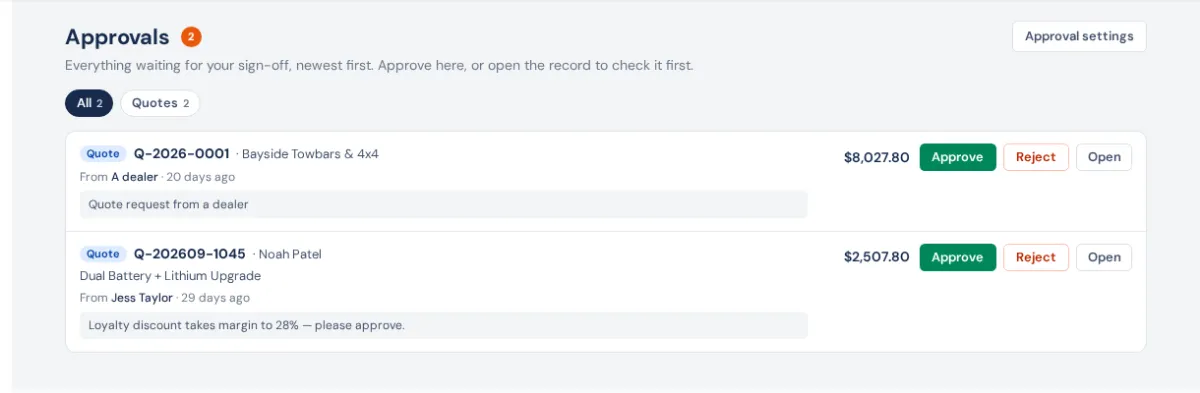
Approvals in the sidebar (under Team) lists every item waiting for approval that you are allowed to approve. The number on the link is how many are waiting on you. When something new arrives you get a notification (and a push, if push is on for your device).
What lands here
| Kind | When it waits | Who can approve it |
|---|---|---|
| Quote | Someone pressed Submit for Approval (a quote rule caught it), or a dealer saved a quote request | Approve quotes |
| Purchase order | Its total is at or above your PO approval limit | Approve purchase orders |
| Invoice | Someone pressed Submit for Approval on a draft | Approve invoices |
| New product | Someone who isn't an owner or admin added a product | Approve or reject new products |
| Stock count | A finished count whose variances are worth more than your limit | Approve stock counts over the value limit |
| Leave | Someone requested leave | Approve leave |
| BOM change | A BOM change was submitted (Manufacturing) | Approve or reject BOM changes |
Owners and admins can approve everything. You only see the kinds your role can approve; someone who can't approve anything sees an empty list.
Approve or reject
- Open Approvals. Pick a chip (Quotes, Purchase orders…) to see one kind, or All.
- Each row shows what it is, the customer, supplier or person, the amount, who asked and when, and their note.
- Press Approve, or Reject (quotes, products, BOM changes), Send back (invoices go back to draft) or Decline (leave). You're asked for a reason; products and BOM changes need one, the rest are optional.
- Open takes you to the record to check it first.
Two kinds are only decided on their own screen:
- New products: Review opens Product approvals, where you check the fields before the product is added. You can still Reject from the list.
- Stock counts: Open count opens the count on Cycle Counts, where Apply posts the variances. Its value is a cost, so it only shows if your role can see costs.
Purchase orders have no reject: open the PO and change it, or cancel it.
Your own requests
Something you asked for shows Your own request — someone else must approve it, with only Open. Nobody approves their own quote, invoice, over-limit PO (as its buyer), leave or BOM change, with these exceptions: owners and admins may approve their own invoices and BOM changes, and the owner their own leave and PO. Items you can't decide don't count in the number on the link.
If something's not right
- The Approvals link is missing: your role can't approve anything. See Roles and permissions.
- Approve says I don't have permission: the area checks again when you press it. Ask an owner to tick the permission in Settings → Roles.
- No notification arrived: notifications go to active staff whose role can approve that kind, never to whoever asked. Check Notifications on this device.
- Nothing ever needs approval: the rules are off. Set them in Settings → Approvals.